
Programming Languages
 There are four fundamental phases in most, if not all, software engineering methodologies. These phases are analysis, design, implementation, and testing. These phases address what is to be built, how it will be built, building it, and making it high quality. . These steps together define the cradle-to-grave life cycle of the software project. Obviously, if an action is done many times, it needs to be done correctly and efficiently.
 You wouldn't go to a doctor who had never been to medical school, or hire a lawyer who never studied law. One side-effect of a world advancing as rapidly as ours is that fields are becoming more and more specialized and narrow. People can no longer get by on general knowledge in their careers, something I found out for myself not too long ago. I'd been out of high school for two years, scraping by on my own and picking up scraps of programming as I went. I saw all of the self-taught programmers breaking into the IT industry, and I hoped to do the same. After all, IT is one of the few industries out there where being creative and a quick learner is more important than a degree.
 You think you got what it takes to learn the fine craft of Java? Well think no more! Find out first hand by evaluating this easy to read Java Tutorial. It is meant to be for the new comers to the world or Java. And I don't mean the coffee neither. The importance of object-oriented programming is that it enables programmers to organize their programs in ways that resemble the organization of objects in the real world, which makes programming easier and more logical. Using object- oriented programming, the overall programs are made up of many different components (called "objects"), each of which has a specific role in a program and can talk to the other components in predefined ways.
 If you have some misconception in mind that the programming languages are easy or hard, I am afraid to say that you are mistaken. To tell you frankly about the programming languages, there is nothing such as easy or tough programming language. The only thing that you need to keep in mind while stepping into the world of programming languages is that which programming language would set your base by giving you in-depth knowledge of programming logics and the basics of programming techniques.
 Once you have learned some programming languages, you feel yourself completely prepared to enter into the programming world, and start working on the programming languages that you have learned. Many students also feel that they have learned extra things which might be helpful in their programming careers. The matter of fact is that the real world is entirely different from what you have been taught in the classrooms.
 There is an old story of how several blind men set out to understand what an elephant was by examining a live specimen. Each of them explored a different part of the elephant's body. One blind man, falling against the elephant's side, proclaimed that an elephant must be very much like a wall. Another, grasping the elephant's ear, decided that an elephant must closely resemble a leaf. One grabbed the elephant's tail and determined that elephants must resemble ropes.
 One famous saying says that programmers are machines that turn caffeine from coffee and Coca Cola into a programming code. And if you ask a programmer when does he like working the most and when is he most productive - he is probably going to say late at night or early in the morning, that is when he has the greatest energy and concentration to work.
 To be a good programmer is difficult and noble. The hardest part of making real a collective vision of a software project is dealing with one's coworkers and customers. Writing computer programs is important and takes great intelligence and skill. But it is really child's play compared to everything else that a good programmer must do to make a software system that succeeds for both the customer and myriad colleagues for whom she is partially responsible. In this essay I attempt to summarize as concisely as possible those things that I wish someone had explained to me when I was twenty-one.
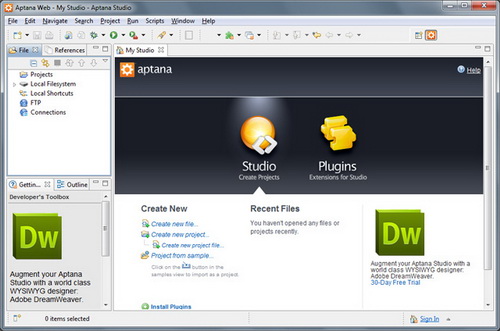 IDE (Integrated Development Environment) represents an integrated development environment in which you can develop applications. This tutorial will be useful to all those that considering doing programing...
 JSPs have dynamic scripting capability that works in tandem with HTML code, separating the page logic from the static elements. JSPs are not restricted to any JSP hosting specific platform or server. It was originally created as an alternative to Microsoft's ASPs (Active Server Pages).
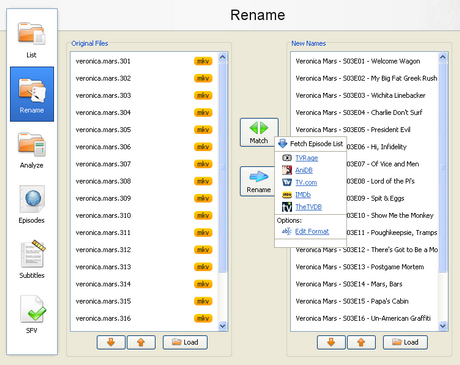 With the increase of capacity in hard drives and the increase of speed of the Internet there is the growth of available multimedia material on users computers. Sometimes it is difficult to find your way in a bunch of files and directories, where there are countless episodes of favorite shows or hours of movies that are waiting for some free time. Although modern file managers have advanced sorting options, renaming or some other searching, they still are not meant for handling a large number of files with multimedia content, that can be pretty diverse.
  "My son wants to become a video-game programmer or designer. What advice do you have?" - This is a very common question. Particularly with video games, kids really enjoy playing them, and are often drawn to the potential of creating them as well. There's even a series of TV commercials that play on exactly that scenario. I've hired a lot of programmers in my career. I've also not hired even more. So I definitely have some thoughts and advice.
What is Java Development?
Java is a high-level programming language developed by Sun Microsystems. Java is an object-oriented language similar to C++, but simplified to eliminate language features that cause common programming errors. Java source code files (files with a .java extension) are compile into a format called byte code (files with a .class extension), which can then be executed by a Java interpreter. Compiled Java code can run on most computers because Java interpreters and runtime environments, known as Java Virtual Machines (VMs), exist for most operating systems, including UNIX, the Macintosh OS, and Windows.
Java is a general purpose programming language with a number of features that make the language well suited for use on the World Wide Web. Small Java applications are called Java applets and can be downloaded from a Web server and run on your computer by a Java-compatible Web browser , such as Netscape Navigator or Microsoft Internet Explorer.
Tips
Vector (n) does not have n elements
In Java, arrays cannot be resized dynamically. If you want a dynamic data structure with random access, you use a Vector. A vector has a current size and a capacity, the number of elements it can ho1d without having to grow, again.
The constructor Vector (int n) builds a vector with capacity, not with size n, as a C programmer would certainly expect.
|
Vector v = new Vector (100); |
If you want a vector with 100 elements, use
|
Vector v = new Vector(100); |
Hassle-free array growth
Suppose you have an array of some type that is full, and you want to grow it.
|
Employee[] a = new Employee[100]; |
That gets boring really quickly. Let's try to make it generic.
|
static Object[] arrayGrow(Object[] a) // not usefull |
Use reflection to make a new array of the same type:
|
static Object arrayGrow(Object a) // useful |
Typical usage:
|
Employee[] a = new Employee[100]; . . . . .// array is full |
This arrayGrow method can be used to grow arrays of any type, not just arrays of objects.
|
int[] ia = ( 1, 2, 3, 4 }; |
Note that the parameter of arrayGrow is declared to be of type object, not an array of objects (Object [] ). The integer array type int [] can be converted to an object, but not to an array of objects!
Anonymous arrays
You can supply initial values to an array as follows:
|
int[] primes = { 2, 3, 5, 7, 11, 13 }; |
If a function requires array parameters, then the traditional solution is to define and initialize an array variable and pass it to the function. For example, the getTables method of the DatabaseMetadata class requires an array of strings "TABLE", "VIEN", "ALIAS", ... to describe which kinds of tables are requested.
|
String [] tables = ( "TABLE", "VIEW" ); |
Rather than introducing a new variable that is only used once, use an anonymous array
|
new Type [] ( value1, value2, ... ) |
The base class Object has a method toString that subclasses redefine to print out a representation of the object. If x is any object, then x.to String()
converts it to a string. If x is a number, then you can't call x. toString (), because numbers aren't objects in Java, and you can't apply methods. Instead, you are supposed to use String.valueOf(x)
Just concatenate with an empty string:
|
"" + x |
This converts x to a string. If x is a number, then its value is turned into a string. If x is an object, then its toString method is invoked. There is no penalty. The Java compiler is aware of this idiom, and it does not generate code to concatenate an empty string.
The lazy programmer's version of tostring Background
It is boring to write toString for every class. The toString method usually just calls toString for every data field.
|
class Employee |
Use the reflection feature to enumerate and print all data fields. Here we take advantage of the fact that a Hash table has a perfectly good toString method. The only drawback is that the fields are printed in random order.
|
public String toString() |
Here is a typical printout:
|
Employee(hireDay=Day[1996,12,1], salary=35000.0, name=Harry Hacker} |
In Java 1.1 , you must paste the code into each class - only the class itself can peek inside its private data. In Java 1.2, use Accessible Object. set Accessible and place the code in a convenient base class
Don't catch every exception
Many Java methods throw checked exceptions. You notice them when the compiler complains:
|
public void writeStack(DataOutput out) |
The first instinct is to surround each line with a try/catch clause.
|
public void writeStack(DataOutput out) |
Whoa! Now the code looks really complicated. Exception handling is supposed to make exceptional situation simpler.
Find the correct place for handling the exception. Perhaps you want to have one try block that contains all commands in the method.
|
public void writeStack (DataOutput out) |
Or even better, try to propagate the exception
|
public void writeStack(DataOutput out) |
If you don't want to deal with exception handling...
When writing a quick and dirty program, it is a hassle to have to pay attention to all the exceptions that are thrown.
|
public void writeStack(DataOutput out) |
Add throws Exception after every method, even main!
|
public void writeStack(DataOutput out) throws Exception |
This is definitely a tactical move for prototyping only. Once you finished your code exploration, you should put the exception handling code at the proper place, and make the exception specifications of all methods precise.
Use printStackTrace when an exception hits
When an exception hits, you want to know the exact circumstances under which it occurred Of course, if you don't catch the exception, the program dies with a stack trace. But if you do catch it, how do you get the stack trace?
You can get a stack trace from any exception object with the printStackTrace method in the Throwable class. The following code catches any exception, prints the exception object and the stack trace, and re throws the exception so it can find its intended handler.
|
try |
Better Buttons
Traditionally, implementing a button is done in two steps:
- Add the button to the user interface in the constructor or init method
add(new JButton("Click me")); - Put the button action into the actionPerformed method
if (arg.equals("Click me")) ( /* button action goes here */ )
This separates the button creation from the button action.
Make a base class BetterButton as follows:
|
abstract class BetterButton exends JButton implements ActionListener |
Now you can define the label and the button action at the same time:
|
add(new BetterButton("Click me") {void action(){ /* button action goes here +/ }}); |
Note that the action. procedure was not defined as public. That saves typing when it is redefined in the anonymous subclass. But it only works if BetterButton is in the same package as the class that creates the buttons.
Easier menus
Adding menu items and listeners by hand is incredibly tedious. Here is some code to build up a typical menu.
|
JMenu m = new JMenu ("Edit"); |
Use a procedure makeMenu to take the drudgery out of making menus. This procedure takes three parameters. The first parameter is either a string or a menu. If it is a string, makeMenu makes a menu with that title. The second parameter is an array of items, each of which is a string, a menu item or null. The makeMenu procedure makes a menu item out of each string and a separator out of each null, then adds all items and separators to the menu. The third parameter is the listener for the menu items. (We assume that all menu items have the same listener.) Here is the call to makeMenu that is equivalent to the preceding menu construction code.
|
mbar.add( makeMenu( "Edit", |
Here's the source code for the makeMenu procedure, which can easily be added to any program that requires a sophisticated menuing system.
|
private static JMenu makeMenu(Object parent, Object[] items, Object target) |
In Windows programs, menus are generally defined in an external resource file and tied to the application with resource identifiers. It is possible to build menus programmatically, but it is not commonly done. In Java, there are no external UI resources and menus must be built programmatically.
Enumeration values in a List field
Suppose you want the user to choose a color from one of the predefined Java colors,
|
Color.red |
The traditional solution is tedious:
- Add strings to a list field
- When a string was selected, use an if/else/else branch to convert it to the enum Value.
if (selection.equals("red")) color = Color.red;
else if (selection.equals("yellow")) color = Color.yellow;
else . . . - Feel bad for not having set up a hash table instead.
The problem is that color. red is the name of a constant, whereas "red" is a string object.
Use reflection to convert the strings!
Sample usage:
|
new EnumList(Color.class, new String[] {"red", "yellow", . . .}) |
The drawback of this trick is that it does not work for internationalization. The enumerated constants are usually in English, but your users may want to see them in the local language, i.e. ot
gelb
Don't use = to compare strings
In Java, strings are immutable. That means, you can't change a value of a string like you can in C
|
string greeting = "Hello"; // C++ |
Of course, in Java you can replace the string to which a string variable refers.
|
String greeting = "He llo"; // Java |
The string "Hello" is unchanged, but greeting now refers to a different string.
That means, strings act just like numbers.
|
int x = 5; |
Strings have the look and feel of numbers in every way but one. You cannot use == to compare them.
|
if {cmd == "Help!")... // no! |
This code tests whether cmd and "Help! " are the identical object, not whether they have the same
contents. You must use equals.
|
if (cmd.equals ("Help! ") )... // OK |
It is unfortunate that the == code compiles. This is one of the few instances in Java where nonsense code
compiles without a warning. (Of course, in C++, there are lots of traps where nonsense code compiles.)
Don't return references to mutable objects
Especially for simple classes, it is common to supply accessory functions for all data fields.
|
class Employee |
Never return a reference to a mutable object. Consider the following.
|
Employee harry = new Employee("Harry Hacker", 35000, new Day(1996, 10, 1,l)); |
EZClone with serialization
Cloning in Java is tedious to implement. You need to
- have the class implement cloneable
- implement the clone method
|
public void clone |
Use serialization for cloning. As long as all data fields are serializable. the entire cloning process can be automated.
|
class EZClone implements Cloneable, Serializable |
A debug window for applets
When you debug an applet inside a browser (especially Internet Explorer), you can't always issue print statements - they don't show up, or they are only logged to a file.
Display the debug printout in a separate window. Here is the code for the window class.
|
import java.awt.*; |
Here is how you use it.
|
class MyFrame extends JFrame implements ActionListener |
Use main for unit tests in every class
Of course, you start a Java program by loading a class and invoking the main procedure. If another class has a main procedure, it is ignored (unless you explicitly call it).
Add a main procedure to every class so that you can run a simple unit test:
|
class MyClass |
Class Objects
Objects of type Class are useful to analyze the capabilities of classes, and to generate new objects. In Java 1,0, you could use the forName method to generate an object of a particular class:
|
Class cl = Class.forName("java.lang.Double"); |
In Java 1.1, you can simply add .class to the name of any type to get the representative class.
|
Class cll = Double.class; // it works for classes |
The Class class should have been called Type since it can represent non-classes as well (i.e. numbers and interfaces). Note that arrays are classes in Java.
Class names of arrays
Class objects are useful for programs that inquire dynamically about the capabilities of classes. The construct Type. class returns an object of type class, as does the static forName method. The getName method returns the name of the class.
These methods are inconsistently implemented for basic types and arrays. Consider the following:
|
Class cll = Double.class; |
Method pointers
One of the less safe features of C is function pointers - it is usually not possible to write generic and typesafe code with function pointers. (In C++, templates can be used to for typesafe generic code.) For example, consider qsort in the standard C library, or a callback in Windows or X Windows. These callbacks use unchecked void* parameters. For that reason, Java did not have function pointers. But they Of course, normally you would use a dynamically bound method with a known name and signature, and then use inheritance to call different functions with similar properties, But sometimes, that is too constraining.
Consider this example - we want to print tables of mathematical functions.
|
{ double dx = (to - from) / 20; |
In principle, this is now possible in Java, but the syntax is more complex. Here is how you can get a method pointer:
|
printTable(0, 10, java.lang.Math.class.getMethod("sqrt", new Class[] { double.class })); |
And here is how you make the call:
|
static void printTable(double from, double to, Method f) |
However, keep in mind that invoking a method is very slow. Only use this as a last resort, if there is no better design involving an inter face and a dynamically bound method.
Using Passwords to protect your Midlets
The simplest way for a MIDlet to safeguard sensitive information, is to prompt the user for a password. You can program this into the MIDlet so that the MIDlet does this when it starts or the first time it accesses sensitive data. You can also have the MIDlet ask the user to confirm certain sensitive operations by reentering the password.
Prompting the user for a password is easily done using either the TextBox or the TextField class, both part of the javax.microedition.lcdui package. The TextBox class displays a top-level window consisting of a title, an optional label, and a text entry field. No other user interface components can be added to a TextBox. So for more flexibility, you can use a TextField component. A TextField is a text entry field that can be placed on a Form, that is, a top-level window that can display multiple user interface components. Both components have an identical interface, so what's being discussed here applies to either component.
Here's the code for a simple password prompter using the TextBox class:
|
// Defines a class that prompts the user |
To invoke the prompter, just create an instance of the PasswordPrompter class, passing it the password to check against (as an integer), the maximum number of characters to allow for the password, the Display instance for the MIDlet, and the screen to display if the correct password is entered. Here is a simple MIDlet that demonstrates the use of the prompter:
|
// A MIDlet that demonstrates the use of the |
In the example above, the password is hard coded to be "1234." Of course, you wouldn't do this in a real application. What you would do is get the password either from a record store maintained by the application or else from an application property. An application property is a value stored in either the MIDlet suite manifest or the suite's application descriptor. To retrieve an application property just call the MIDlet's getAppProperty method. For example:
|
MIDlet midlet = ....; |
Using an application property allows you to customize a MIDlet suite for a particular customer. For example, as part of a servlet-controlled download process, the customer could be asked to enter an email address. The process could then generate a random password and a custom version of the MIDlet suite, and send the password to the customer by email. The customer would have to enter the password to activate the application, once it's on the device.
|
|||