
Other Technologies
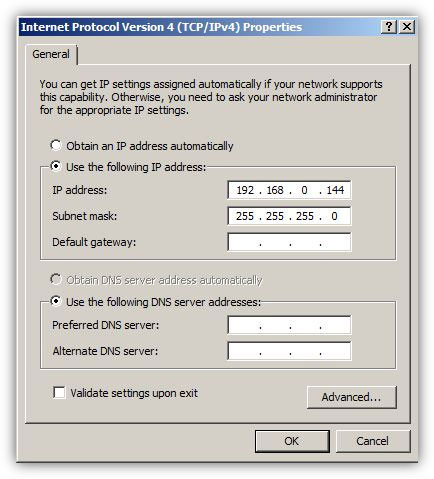 An IP address is a 32-bit number divided in 4 octal numbers and each octal separated by a '.' (dot), technically knows as a period. Administrators assign IP addresses to the computers so that they can be uniquely identified in a local area network and can communicate and exchange information with other computers in the network. IP addresses can be assigned to the computers either manually (static IP addresses) or through DHCP servers (dynamic IP addresses). When administrators plan to assign dynamic IP addresses to the computers they must configure DHCP servers with appropriate IP addressing schemes do accomplish the task. On the other hand, if administrators plan to assign static IP addresses to the computers they must manually go to each computer system in ...
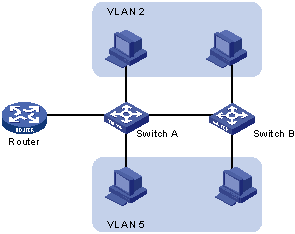 A VLAN is a grouping of computers that is logically segmented by functions, project teams, or applications without regard to the physical location of users. Similar to routers, VLANs offer an effective mechanism for setting up firewalls in a switch fabric, protecting the network against broadcast problems that are potentially dangerous, and maintaining all the performance benefits of switching. You can create these firewalls by assigning switch ports or users to specific VLAN groups in single switches and across multiple connected switches, which will increase security easily and inexpensively by segmenting the network.
 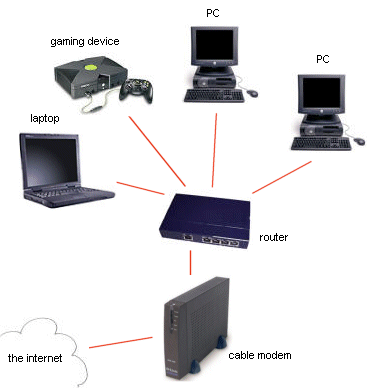 This is an article about setting up home networks. It will help you if you trying to set up a home network. Once you know what type of network you want and you have the necessary hardware, there are four possible steps you can take.
 We all know that we need more bandwidth now, than we ever did in the past. There tons more online games, online movies, online collab work, you name it. And the past standards of Wifi namely 802.11a, 802.11b, 802.11g, 802.11n, and so on) were getting better and better; however, the 802.11ac does the trick. Well, atleast for now it is, until something better comes along.
 Domain Name System or DNS servers are dedicated computers that have network operating systems installed on them and are responsible for resolving hostnames (computer names) to their IP addresses and vice versa. DNS servers are used worldwide and are helpful while accessing the Internet and visiting websites. Every Internet Service Provider or ISP has its own DNS server which receives name resolution requests from the subscribers of that ISP and resolves the requested host names to their corresponding IP addresses.
 Apart from star topology that is widely used in almost every network environment, the other type of topology that is complex while setting up but provides 100% fault tolerance to the network is Mesh Topology. In this topology, every computer that has to be connected to the network is connected to every computer that is available in the network. For example if there are four computers namely A, B, C and D, then A will be connected to B, C and D. Likewise B will be connected to A, C and D and so on. This means that when mesh topology is used while establishing a network setup, it is very unlikely that the network would ever face congestions or would ever fail.
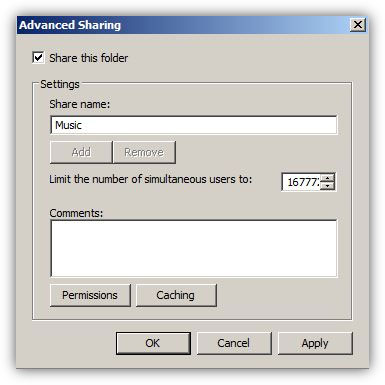 In organizations or home setups where there are multiple computers connected to each other, in order to transfer files from one computer to another administrators use to share the folders on one computer (generally known as file server) and make them accessible from all other computers in the network. In order to do so administrators normally configure and set NTFS and share permissions on the shared folders which, as a result, help them control the accessibility of user accounts or groups on them.
.gif) Wireless networking is a wireless communication, but as a way to get a computer with a wireless card connected to the SOHO device that allows wireless communication (not to all devices) and become a full member of the local network. SOHO device works as a wireless access point (WAP - Wireless Access Point). In today's rules, all laptops have this feature built-in antenna and they are incorporated in the monitor frame.
Wireless networking is a wireless communication, but as a way to get a computer with a wireless card connected to the SOHO device that allows wireless communication (not to all devices) and become a full member of the local network. SOHO device works as a wireless access point (WAP - Wireless Access Point). In today's rules, all laptops have this feature built-in antenna and they are incorporated in the monitor frame. 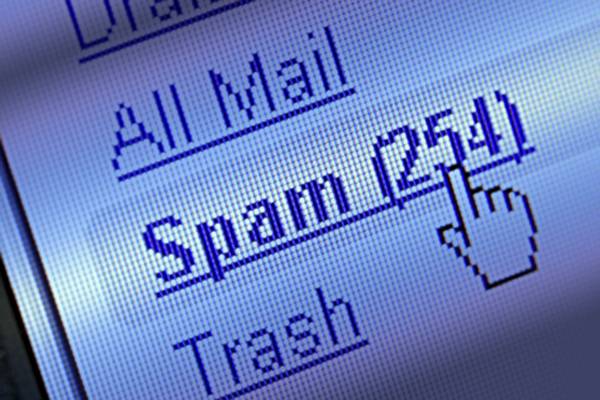 We have all been the target of spammers. Imagine yourself sitting at home, by your computer and then the spamming begins. You are sure to get tons and tons of messages you don't want if you are the target of a spammer. But you are not the only one, read the text below to find out more.
 Ever wonder if it's a good idea to switch your home LAN to wireless? This is a very easy to understand discussion about the security matters involved.
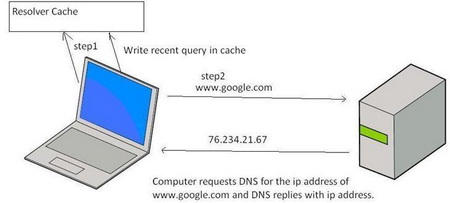 To help speed up Web browsing, Windows XP comes with a local cache containing any DNS addresses that have been looked up recently. Once an URL has been resolved by an Internet name server into a numerical IP, the information is stored locally. Anytime your browser requests an URL, Windows XP first looks in the local cache to see if it is there before querying the external name server used by your ISP. If it finds the resolved URL locally it uses that IP. This is supposed to save time and cut down on Web traffic.
 In many homes, the network can't easily reach all areas a person needs. This fact surprises many people. Stringing network cables to some rooms may prove impractical, of course. But even in wireless networks, "cold spots" where the Wi - Fi radio signals will not reach the corner of the bedroom, study or porches are also common. Be prepared that there is some planing needed in network installation.
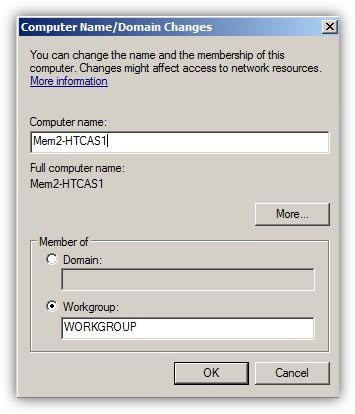 In any computer that runs any operating system of any platform, computer name plays an important role when it comes to its identification. Name that an administrator assigns to a computer must be unique for that computer in the entire network. In case, because of errors or deliberately, administrators assign identical names to 2 or more computers, all the computers with common names stop communicating with other computers in the network. In Microsoft Windows platform computer names are also known as hostnames. When administrators install Microsoft Windows operating systems on the computers, operating systems automatically generate random ...
 With the Internet there came a whole new era of information technology, transfer and access. Also, the Internet connected the world in a way that has never been see before, through games. Alongside the Internet came huge amounts of brand new games, genres, software and a lot of other things. And also the Internet seems to be getting faster as we go into the future.
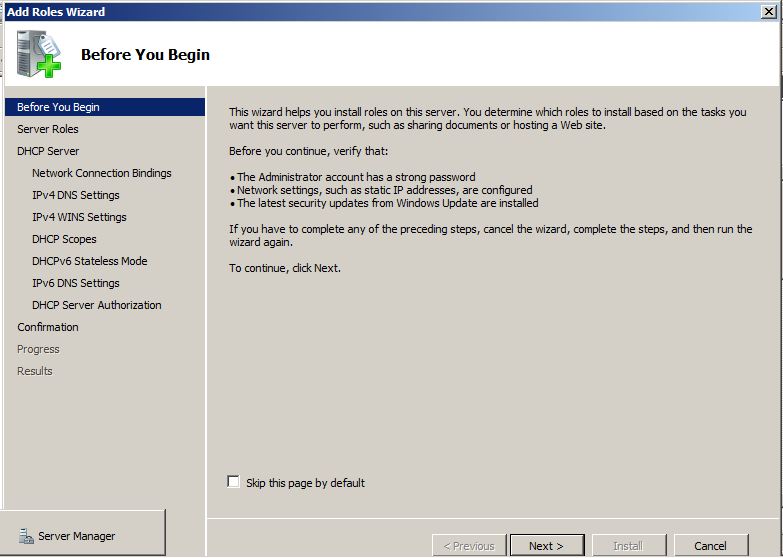 When Windows Server 2008 R2 computer is configured as a DHCP server, it can have multiple NICs and each NIC can be configured to provide IP addresses to the computers that belong to different subnets. For example, if Windows Server 2008 R2 DHCP server has NIC-1 with 192.168.0.22 and NIC -2 with 192.168.1.22 static IP addresses assigned to them, both NICs, if configured appropriately, can provide dynamic IP addresses to the clients connected to their respective subnets.
 You wouldn't go to a doctor who had never been to medical school, or hire a lawyer who never studied law. One side-effect of a world advancing as rapidly as ours is that fields are becoming more and more specialized and narrow. People can no longer get by on general knowledge in their careers, something I found out for myself not too long ago. I'd been out of high school for two years, scraping by on my own and picking up scraps of programming as I went. I saw all of the self-taught programmers breaking into the IT industry, and I hoped to do the same. After all, IT is one of the few industries out there where being creative and a quick learner is more important than a degree.
 LAN Bridges were used to separate and isolate multiple collision domains from each other in large broadcast domains. Bridges had two or more LAN ports to which other central devices, such as network Hubs, were connected via LAN cables. Unlike network Hubs that used to forward data packets to every PC that was connected to the ports, Bridges acted more like LAN Switches to identify destination ports and transferred the data packets only if the packets were destined to reach the segments that were connected to their other ends. Bridges used to calculate and identify the destination segments on the basis of physical (MAC) addresses of the central devices that were connected to their LAN ports.
 LinkedIn is the world's largest business professional social network where business people share experiences, participate in discussions, share interesting content and, of course, find new employers.
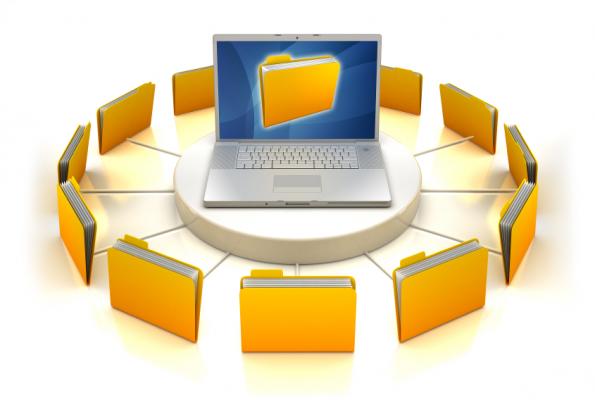 Microsoft Windows (and other personal operating systems) contain a built-in file sharing system. For example, the Windows folder can be shared over a local network (LAN) or the Internet by using Explorer as well as network drive mappings. You are also able to set restrictions on access security in order to control who can get the shared files.
 Internet access usually needs people who use it to subscribe to it to be able to connect to it. Next to the normal use policies, these terms also have a limit set on the use of the Internet connection over some amount of time. The limits are usually known by the name data plans. DNS records are the objects that are created either manually by the DNS administrators or automatically by the DNS servers themselves. A DNS server can have indefinite numbers of records and each DNS record is helpful in resolving the query of its own type. For example a Host (A) record in DNS server helps resolving a hostname to its corresponding IPv4 address whereas Host (AAAA) record resolves hostname to its corresponding IPv6 addresses.
 Since over a decade, star topologies have been preferred over bus topologies by the administrators. In star topology, a central device (Hub or Switch) is used to connect multiple PCs in a local area network. Central devices that are used in star topologies have multiple LAN ports integrated in them and the PCs are connected to the central devices via patch cables. In most cases patch cables are twisted pair cables that have four twisted pairs (eight wires in all) which are crimped to the RJ-45 connectors. The reason why star topology is mostly preferred nowadays is that it does not provide a single point of failure and is highly scalable. This means ...
 If you see someone who is wishing to do a reset on their home router there might be a lot of reasons for them to do it. The most common things are forgetting the admin password, forgetting the Wi-Fi security key and also troubleshooting problems with connection.
 The Internet has revolutionized the way business is done, but what happens when the Internet fails? In that case you can use several alternatives such as Wireless Internet or you can go to the nearest Internet cafe. But, there is a third alternative when the Internet crashes, your old mobile phone. In the following text you will find instructions that describe the way to turn your old mobile phone into a modem.
 A 60 GHz protocol is a network protocol that runs in a range that is close to 60 GHz, obviously. But, this is quite flexible as the range can go up to 64 and down to 57. If you compare other protocols like Wi-Fi or any other wireless protocol you will see that they are significantly lower (Wi-Fi is somewhere around 2-5 GHz). This major difference is what contributes to the problems and advantages in 60 GHz protocols.
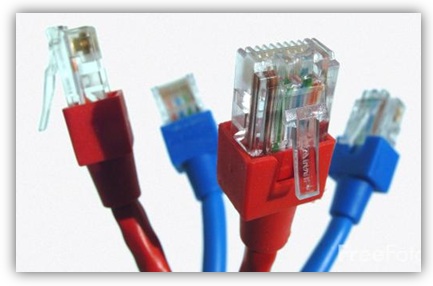 In any wired LAN environment it becomes necessary to take utmost care while selecting cables for the network setup. Engineers and administrators may select cable types according to the requirements of the LAN setup, budget involved in the infrastructure installation and the scalability of the network. Since cables play important role in any wired network infrastructure it becomes important for the administrators and engineers to select appropriate cable types so as to meet and fulfill the requirements of the organizations.
 TCP is a common transport protocol that is used in almost all the internet applications. The main problem with the TCP is that TCP falsely assume the packet loss as congestion. The TCP sender detects a packet loss when a time out happens or duplicate acknowledgements happen.
  Modern metropolises can't function without computers and the Internet. Water supply and electricity, mobile and telecommunications - all function with the help of the Internet. What would happen if it terminated? If the computer network or a system server failed, that would lead to devastating consequences for people and the economy. According to some estimates Internet crime brings more profit than drug related crime. Threats from the virtual space can go much further than home computers or work place computers.
%20Record.JPG) In any network setup DNS server plays an important role as it helps client computers to resolve names to their respective IP addresses. When a DNS server is installed in a network it automatically creates a Forward Lookup Zone and adds some records in it by its own. A DNS server can have several record types depending on the type of network.
In any network setup DNS server plays an important role as it helps client computers to resolve names to their respective IP addresses. When a DNS server is installed in a network it automatically creates a Forward Lookup Zone and adds some records in it by its own. A DNS server can have several record types depending on the type of network. So I thought this morning I would try to be the optimist, and give reason to hope for the future of the Internet by drawing upon its present.
Now, it may seem like there is less hope today than there was before. People are less kind. There is less trust around. I don't know. As a simple example, we could run a test here. How many people have ever hitchhiked? I know. How many people have hitchhiked within the past 10 years? Right. So what has changed? It's not better public transportation. So that's one reason to think that we might be declensionists, going in the wrong direction.
.jpg) "Burning" copies to optical (CD-ROM or DVD-ROM) discs is a very simple way if you want to back up your files, or anything else. You will be able to select folders and files you want to backup, and after that copy those files by using a computer CD/DVD writing program which does exactly that. You don't necessarily need to be connected to a network for the backing up if your computers have a CD-ROM or DVD-ROM writer.
"Burning" copies to optical (CD-ROM or DVD-ROM) discs is a very simple way if you want to back up your files, or anything else. You will be able to select folders and files you want to backup, and after that copy those files by using a computer CD/DVD writing program which does exactly that. You don't necessarily need to be connected to a network for the backing up if your computers have a CD-ROM or DVD-ROM writer.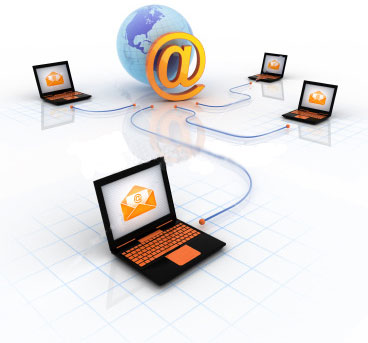 This very much to the point guide highlights some important networking terms and topics and simplifies them to us, the mere mortals.
 People sometimes refer to wireless networking as "Wi-Fi", even when the network uses a completely unrelated type of wireless technology. Although it may seem ideal to all the world of wireless devices using a common network protocol, such as Wi-Fi, rather today's networks support a wide range of protocols. Reason: No protocol ensures the existence of an optimal solution for all the different wireless customs that the people want. Some are better optimized to preserve battery life on mobile devices, while others offer higher speeds and more reliable and long-distance connections.
 Cloud networks are already widely used, there are a lot of software and technology that help efficient work. Cloud solutions are offered by all the major players in the IT market. Finally, many people are already using cloud networks, and among them is probably you. Do you have a Gmail / Hotmail?
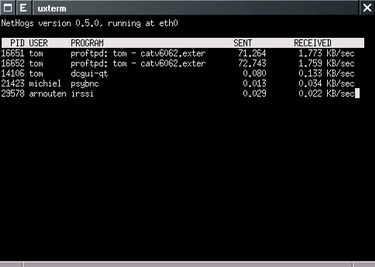 While you are trying to access your blog you notice that the page is loading very slowly. You see that Dropbox is syncing something and you know that YouTube is on. You have torrents you want to download. The easiest way would be to turn all that off and let the blog load, but that is not what you want.
 The first time HomePlug was created is in the year of 2001. That first version had a max speed of between 14 Mbps to 85 Mbps. But, this was just in theory and as we all know that is not very real.
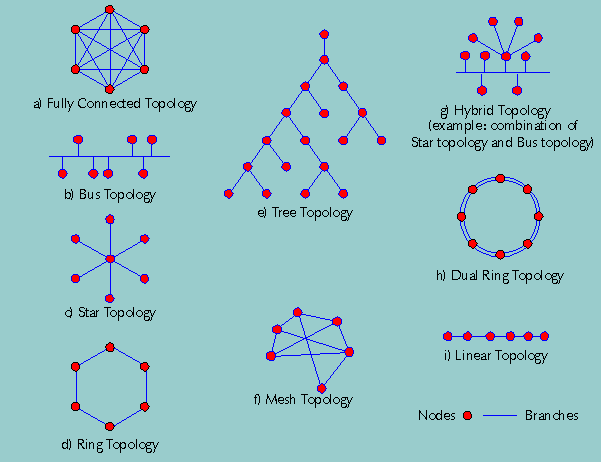
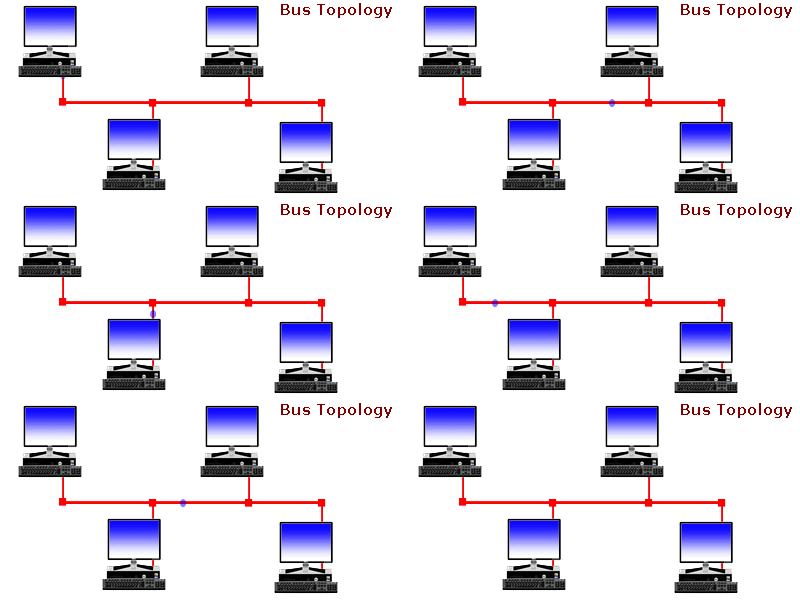 Ever wonder... how are all of these file, print, fax, and computer resources connected so as to allow the typical desktop computer to access them? Network topology refers to the way networked computers and network resources are connected. The three most widely used topologies are bus, ring, and star. Note that the following network topology diagrams are logical views of the topologies they represent and don’t necessarily match the physical (electrical) interconnections on the networks.
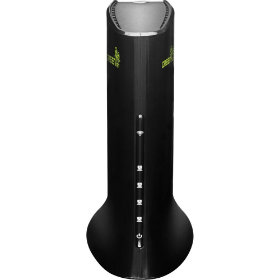
.png) This time we had the chance to try out a product from the Chinese firm D-Link, a renowned manufacturer of computer networking equipment. It is a product that is called Cloud Router and is classified by the marking DIR-605L. In the package, next to the router, you get a voltage adapter (5V DC, 1A), LAN cable, CD with instructions and software, as well as printed documentation.
This time we had the chance to try out a product from the Chinese firm D-Link, a renowned manufacturer of computer networking equipment. It is a product that is called Cloud Router and is classified by the marking DIR-605L. In the package, next to the router, you get a voltage adapter (5V DC, 1A), LAN cable, CD with instructions and software, as well as printed documentation. The speed of wireless routers is usually advertised in Mbps (megabits per second). The newest wireless routers claim to have speeds of 450 Mbps, while the outdated older models give only 11 Mbps. The huge speeds might entice you to buy them, but be aware that the speed you will be averaging is not anywhere near the maximum speed they state. And another this is that those new routers can't speed up your internet connection, you may get a bit more speed but it is probably not worth the cost.
 Ever make it just in time for work after driving through rush hour traffic and realize that you've left an important file on your computer at home? Or have you ever had to work late in the office because you don't have access to files, applications, or shared resources at home? Well maybe your life has just become way easier. Introducing, GoToMyPC! A wonderful little service that'll let you access your home or work computer from anywhere! It takes two minutes to download this amazing software onto your computer and you'll have the power to access your computer from any web browser on any computer. A simple little technology of PC-to-PC connection or as GoToMyPC calls it, "Remote-Access Solution" will go a long way for anyone.
 Sniffing and spoofing are security threats that target the lower layers of the networking infrastructure supporting applications that use the Internet. Users do not interact directly with these lower layers and are typically completely unaware that they exist. Without a deliberate consideration of these threats, it is impossible to build effective security into the higher levels. Sniffing is a passive security attack in which a machine separate from the intended destination reads data on a network. The term "sniffing" comes from the notion of "sniffing the ether" in an Ethernet network and is a bad pun on the two meanings of the word "ether." Passive security attack are those that do not alter the normal flow of data on a communication link or inject data into the link.
 In the world of computers, networking is the practice of linking two or more computing devices together for the exchange of data. Networks are built with a mix of computer hardware and software.
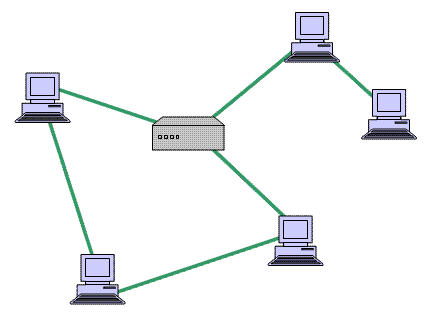 Mesh networking is a way of connecting a few devices between themselves. In that way there are many paths that lead to the destination device.In that way if one path clogs up there are many other paths that can be used to avoid slowness and problems. If there was only one path and there was a problem there would be slowness and many other problems, in this way you can avoid them almost completely.
 Ever wonder what'll happen when all the possible IP addresses will be taken? Remember when the phone companies ran out of 800 numbers? Well the same thing is about to happen with IP addresses and quickly. With IP V-6 every person on earth could have a million uniquely addressees and the individually locatable IP devices Read all about it here.
 Speedtest.net works in a way that it uses the transferring on big files and then measures how long it takes to transfer that file, thus telling you your bandwidth. This is pretty good, but the bad thing is that it can't measure your network latency. It also looks pretty cool.
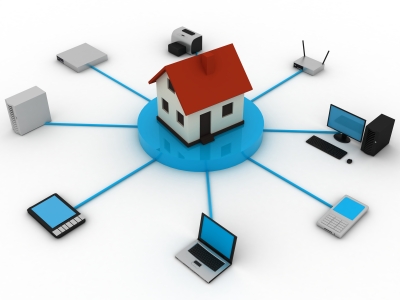 It is a great feeling to have state of the art home network. But the moment you leave the house, all of the network is out of reach. This is not always the case, if you know what you are doing of course. You can be thousands of miles away and still use your network to the full advantage.
.jpg) Instead of cabling 2 computers directly, they can be connected in an indirect way through what is called a central network fixture. The central network fixture needs 2 network cables, and each one should connect one computer to the fixture. There are a few types of fixtures that exist and are used for home networking. See article for more info...
Instead of cabling 2 computers directly, they can be connected in an indirect way through what is called a central network fixture. The central network fixture needs 2 network cables, and each one should connect one computer to the fixture. There are a few types of fixtures that exist and are used for home networking. See article for more info... In the last article we have talked about the wired experience and all the pros and cons when it comes to speed, reliability and all the other things you need to enjoy playing video games on the web. In this text we are going to take a different approach and talk about wireless connections and everything that there is to know about them.
 If you are using the Internet, and you are (unless you have been hiding under a rock for the past 15 years), you have to know something about the various kinds of connections that exist. Down below you can see them listed.
 Computer networks for home and small business can be built using either wired or wireless technology. Ethernet port is the traditional choice in homes, but Wi-Fi wireless technology is rapidly gaining importance. Wireline and wireless can claim advantages over others and both are great for home and other things such as local area networks (LAN).
 It used to be that businesses had a major influence on what types of products and services were available to the general public. In the early days of the Internet, networking LAN technologies and needs were the driving force behind the creation of many software applications and tools that users accessed. The growing popularity of the World Wide Web with casual computer users led to a paradigm shift in how to approach usable software solutions for these users. Simple to install and use software applications such as file sharing, e-mail and instant chat programs were instantly popular.
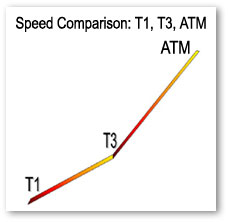 This is something that can come in handy for those of you who are simply curious about internet backbone speeds.
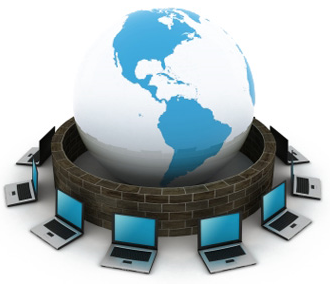 The most popular application of computer monitoring software is on office networks in a business establishment, where each workstation is actively monitored to see how the employees spend their entire work day.
Business applications of computer monitoring software essentially draw its basic function from the principle that increasing the potential productivity could generate a more positive flow in business. In a sense, the computer monitoring software here is regarded as a "performance balancer", by keeping an eye on employees and making sure that they ...
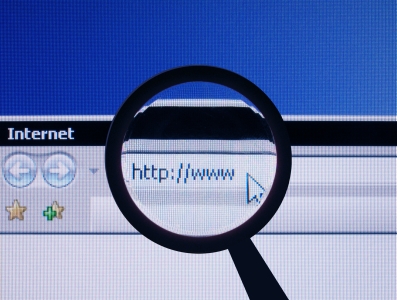 The official website for the most popular operating system based on Linux has recently gone through extensive changes and improvements. This page now has fewer major categories, subsections are organized much clearer, and the search window is constantly available. Images and text are now adapted for mobile devices. With clear instructions and explanations of the characteristics of this OS you have the option to consult the community and the development team. For users who want to test Ubuntu there is no better destination on the web.
 Network hubs were the central devices that network administrators used to use to establish a network setup using Star Topologies. Network hubs had multiple RJ-45 ports integrated in them and were used to connect one end of the LAN cables that had RJ-45 connectors crimped to them. The other end of the cables were connected to the RJ-45 ports available on the PCs. Network hubs were available with 4, 8, 16 and 24 ports. Administrators also used to cascade two hubs for larger network setups. Cascading means that one RJ-45 port of one hub connected to ...
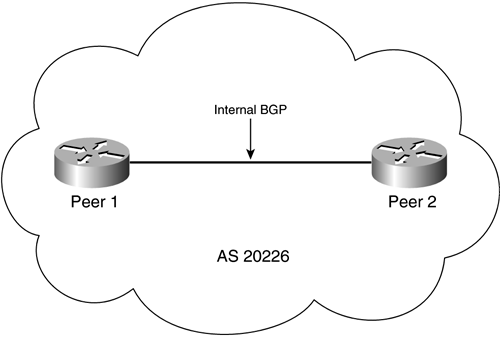 Today we are going to talk about multihoming networks. They are a way to share a few connection into external network. There is also a way to increase your network speed by using multihoming.
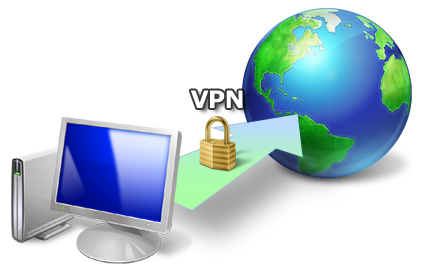 There are two key advantages that VPN gives to organizations who are seeking to have safe and secure networks and offer them to their client base. Those advantages are a lot less money to pay and a great network scalability. It is also very easy to use, so clients that join VPN networks won't find it difficult to do what they want.
 Usually online gamers will use devices called lag switches. Lag switches are used to intercept the signals from the network and then cause huge delays which then affects other players in a way that is virtually impossible to play. Either way, don't play with lag switch users and everything should be fine.
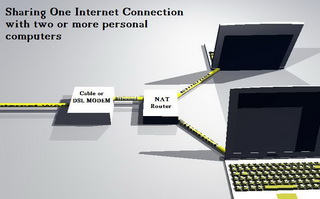 This article explains Internet Connection Sharing in detail, and is designed as a practical guide to help you set it all up. There are many different ways to set up Internet Connection Sharing, but for the purposes of this article, it is assumed that you have two or more computers connected via a hub or switch.
 IP address conflicts are a pretty serious thing. They happen when there are two computers that are using the same IP address. If this happens, the computers can work offline only, the Internet is out of reach. There are many ways this can happen and here are some of them.
 In this time, our children are using computers more and more. There have been discussions going on for years now about the use of computers in children. Some say the effects are good, some say the effects are bad, some say there are no effect at all. If you have a child and you are wondering if you are going to let your kid go on the network, read this text about children and networks.
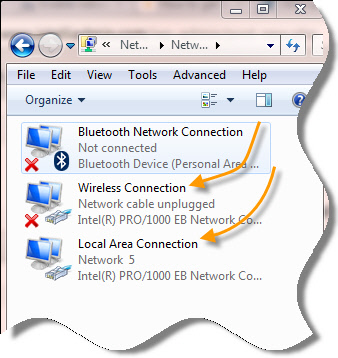 Did you recently find out that after your PC starts up fresh, your internet doesn't work? So you probably tried everything and the only thing that seems to work is to disable the "Local Area Connection" (adapter), and then to enable it back again. At least that's what happened to me.
I've had this problem for almost a year now but I finally want it stop. All the resources online tell me that it's probably my network driver that may need an update. Well, all my drivers are updated, and the problem still remains. Now What? Okay, I'll be honest... I don't know why it happens but 1 out of every 10 or 12 PC's will come across this problem.
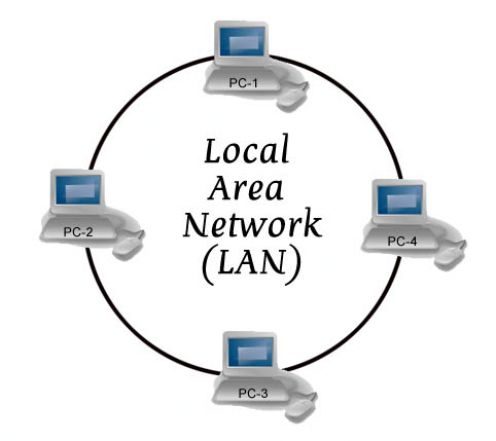 There are various types of computer network designs but due to some reasons we won't bother to explain all networks are referred to as an area network. The most notable area networks are LAN (Local area network), WAN (Wide are network), PAN (Personal area network), WLAN (Wireless local area network) and many others.
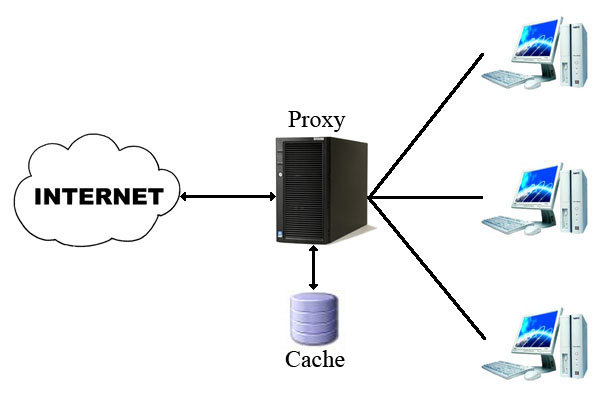 When you connect to the Internet, your home computer (or network router) is assigned a public IP address. As you visit Web sites or other Internet servers, that public IP address is transmitted and recorded in log files kept on those servers. Access logs leave a trail of your Internet activity.
  Routers are the devices that are used to connect two different networks in order to allow communication between them. Networks with different network IDs are considered to be different. By default, no communication can take place between two different networks, and this configuration prevents computers of one network from getting accessed by the computers on the other network, which may belong to another organization, building premises, home, etc.
.jpg) Do you want to get every computer in your home on the Internet? Do you want to share music, photo or video files stored on the computer? What do you think of stream movies? Well, you can do this and much more over the wireless networks.
Do you want to get every computer in your home on the Internet? Do you want to share music, photo or video files stored on the computer? What do you think of stream movies? Well, you can do this and much more over the wireless networks.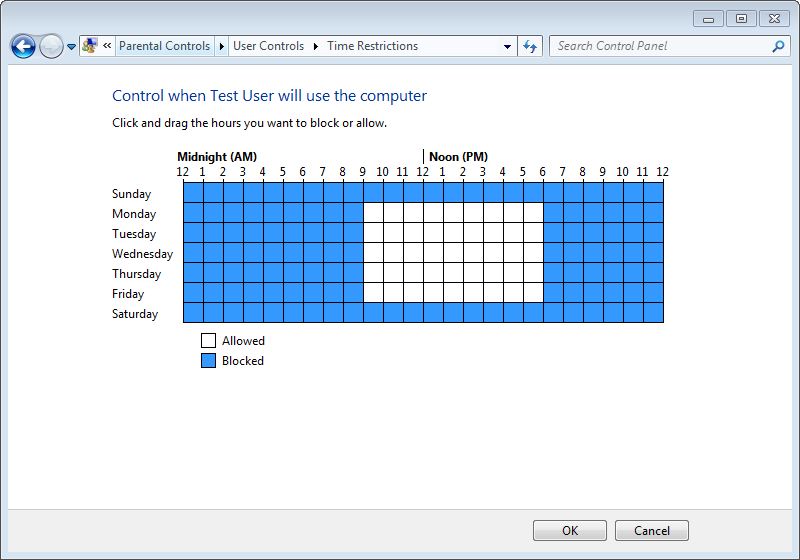 Logon time is the duration between which the operating system allows user accounts to logon to the computer. Logon time can be configured on the operating system only by the administrators of the computer. User accounts that belong to non-admin groups cannot modify or define the logon time and are only allowed to logon to the computer at the times specified for them by the administrators.
.jpg) The first advantage we are going to mention is the ease of cabling powerline networks to computers. Most common homes have a lot of power outlets, and they are usually present in every room so if you want to cable your computer to a powerline network is fast, simple and easy. The reach is also significantly higher and greater than with Wi-Fi networks.
The first advantage we are going to mention is the ease of cabling powerline networks to computers. Most common homes have a lot of power outlets, and they are usually present in every room so if you want to cable your computer to a powerline network is fast, simple and easy. The reach is also significantly higher and greater than with Wi-Fi networks. Internetworking with TCP/IP has been around for many years-almost as many years as Unix has been available. TCP/IP, or Transmission Control Protocol/Internet Protocol, grew out of the work that was done with the Defense Advanced Research Projects Agency, or DARPA. In 1969, DARPA sponsored a project that became known as the ARPANET. This network mainly provided high-bandwidth connectivity between the major computing sites in government, educational, and research laboratories.
 What eventually became one of the most significant advantages of the Internet is the possibility of simple access to any information placed on any computer attached to this global network. We can access the information that we need in various ways, from searching on the Web, to downloading complete files, even the ones that are pretty large. This text should help the enlightening of the dilemma about downloading files from the Internet and to give you short instructions on how to do it.
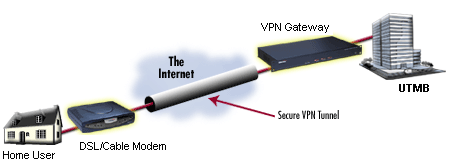 There are two kinds of tunneling that Virtual Private Networks support and they are called compulsory and voluntary. They are equally being used, as in none is more popular than the other.
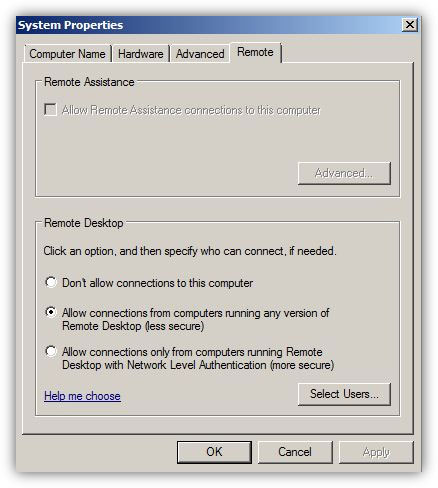 The concept of Remote Desktop was first introduced with the release of Microsoft Windows 2000 (Professional and Server editions) which was then carried forward to all the successor versions of Microsoft-based operating systems. With the help of Remote Desktop administrators can manage remote computers by bringing their entire consoles on the local computer from where they have initiated the Remote Desktop sessions. By using Remote Desktop administrators can administer remote computers as easily and comfortably as they were physically present in front of the remote computers and were locally logged on to them. Since Remote Desktop allows administrators to manage multiple remote machines from single central location, it saves a decent amount of time that administrators would otherwise had to spend if there was no Remote Desktop feature available in the operating systems.
.jpg) "Unable to establish connection" - VPN client can not reach the server. This can happen if the VPN server is not connected to the network, the network is temporarily the network is overloaded with traffic. Finally, the local router can be incompatible with the type of VPN and maz require updating the router.
"Unable to establish connection" - VPN client can not reach the server. This can happen if the VPN server is not connected to the network, the network is temporarily the network is overloaded with traffic. Finally, the local router can be incompatible with the type of VPN and maz require updating the router. Some people thought that the whole notion of terminal services is a bit to technical for them to understand. Well, MicroSoft and our good friends that work for Bill Boy Gates have come out with terminal services, changed the name and made it a whole lot easier to understand. Find out how!
 As you see a business growing, it is normal that their layout of networks grows with them. Companies that are placed in a few locations will create internal connections that are called campus networks if their buildings are close to each other and use WAN networks if they are more distant.
 A big thing people used to do some years back was to tweak their dial up. They did this because it was slows and they wanted it to be faster. The things they did usually were useless, but there are other things you can do that work.
 In computer networks, scope (area) up to where data that is transferred over the cables or the wireless media with certain conditions is categorized in two domain main types. In complex network setups, because multiple segments are connected to each other via different types of central devices, it becomes important for the administrators to separate broadcast domains and reduce the numbers of collision domains. A central device in which collisions may occur is Hub because of it logical Bus Topology.When a DNS server role is installed on a network operating system, by default forward lookup zone is automatically created and the DNS server works as Caching Only server that caches the results of all the queries that it resolves. Forward lookup zone of a DNS server resolves IP addresses to their corresponding host names, is used in most network setups in production environments.
 Do you often feel tethered to your home computer or other electronic devices? Tired of the endless cords to untangle under your office desk? Then it's time to go completely wireless! It's easier than ever to live a completely wireless lifestyle, thanks to innovations in the consumer and business electronics industries. Review some of the latest gadgets and services that will have you free-wheeling it in no time.
 Bluetooth is a specification (IEEE 802.15.1) that uses low-power radio communications to connect phones, computers and other network devices over short distances without wires. The name Bluetooth is borrowed from Harald Bluetooth, King of Denmark that lived more than a 1,000 years ago.
 DoS stand for denial-of-service attack, a type of attack on a network that is designed to bring the network to its knees by flooding it with useless traffic. While DoS attacks do not usually result in information theft or any security loss for a company, they can cost an organization both time and money while their network services are down.
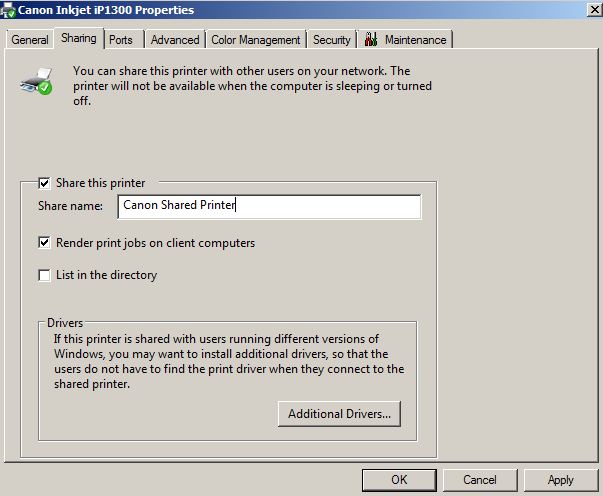 Just like folder sharing in Microsoft Windows operating systems, printer sharing is also an important part in any complex network setup or in simple networking in homes. In either case mostly one printing device is bought and is shared among all the computers connected to the network. Since printing devices, sometimes, are expensive sharing them among all computers in networks is a cost effective approach for both administrators and home users.
 This term was used for the first time more than 200 years ago. The coax cable was created in the 1880s, and the most common purpose was connecting TV's and antennas. But, today there is a different usage. They provide 10 Mbps Ethernet connections. The time when this kind of connection was most used was in the 80s, but now we are talking about the 20th century.
  Do you need to copy a heavy file from another laptop without using pen drive or connecting cables? Of course, this can be done by using electronic transfer methods like ftp or online data storage systems. However, these methods are not only time consuming, they often lead to increased data transfer costs. Moreover, what if there is no internet connectivity available in the immediate vicinity? Under such circumstances, you can connect two laptops through Bluetooth and exchange files seamlessly.
 CompTIA A+ Certification is widely recognized as the first certification you should receive in an information technology (IT) career. Whether you are planning to specialize in PC hardware, Windows operating system management, or network management, the CompTIA A+ Certification exams measure the baseline skills you need to master in order to begin your journey toward greater responsibilities and achievements in information technology.
CompTIA A+ Certification is designed to be a "vendor-neutral" exam that measures your knowledge of industry-standard technology.
 Standard default values are usually used by routers for their Wi-Fi radio settings. The variations of of wireless protocols that will be supported by the router are managed by the Wi-Fi mode. What frequency band will be used by a wireless router for radio communication is determined by the Wi-Fi channel number. The usual Wi-Fi channel numbers in most countries are somewhere between 1 and 11.
 Cloud network devices are very important to us, so the company D-Link did something about that and they came up with a new network device. D-Link is unveiling another member of their family of Clouds: DNS-320L (Cloud ShareCenter 2-Bay Network Storage Enclosure).
 Here it depends on the quality of the video you are viewing. It is of course needed to have a basic network speed value, but if the quality of the video is really low you won't need much bandwidth and if the quality is 1080 p you will need good bandwidth. Also if the video you are watching features a lot of moving and effects higher bandwidth will be needed opposed to videos with less movement and effects.
 Information technology is mostly referred to as consisting out of three main parts. Those three parts are decision support, business software and computational data processing. Those three terms were first mention in a Harvard article. That article is usually considered to be the birthplace of modern IT. They were working on the go and by doing so set the foundation for modern information technology. Modern IT involves computer tech support, business software development, information security, business computer network and database administration jobs.
.png) We mentioned that today smartphones and tablets are becoming the dominant devices for Internet access. Research shows that users of smartphone devices for Internet access prefer WiFi, regardless of the quality and availability of 3G/4G networks. Thus, users are increasingly turning to Wi-Fi access as an alternative to 3G access. 36% of Internet traffic today is carried out via WiFi.
We mentioned that today smartphones and tablets are becoming the dominant devices for Internet access. Research shows that users of smartphone devices for Internet access prefer WiFi, regardless of the quality and availability of 3G/4G networks. Thus, users are increasingly turning to Wi-Fi access as an alternative to 3G access. 36% of Internet traffic today is carried out via WiFi. 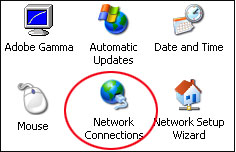 This is not a very difficult task, but it is not a very easy one. It should probably take you somewhere around 5 minutes, but you have to have the knowledge needed to do this. If you want to acquire that knowledge, read this text about installing the Client for Microsoft Networks.
 A special type of network device is called the hub and can be found in many home and small business networks. Although they have been around for many years, the popularity of the hub has recently exploded, especially among people relatively new to networking. Do you have a hub, or are considering buying one ? This article explains the purpose of the hub and some of the technology behind it.
.png) Communication via e-mail, even though it is one of the oldest services on the Internet, is not loosing lose it's intensity and popularity. On the contrary, the development of new opportunities for the use of this service does not fade over the years, so the older POP and SMTP accounts and the Internet service providers are slowly being replaced by the IMAP protocol and orders which do not depend on which way you access the Internet device.
Communication via e-mail, even though it is one of the oldest services on the Internet, is not loosing lose it's intensity and popularity. On the contrary, the development of new opportunities for the use of this service does not fade over the years, so the older POP and SMTP accounts and the Internet service providers are slowly being replaced by the IMAP protocol and orders which do not depend on which way you access the Internet device. Virtualization is a process in which a physical computer a.k.a. host computer contains virtual machines that are stored in them in form of files. These virtual machines act exactly the way the physical computers do and can be mapped with the NICs of the host computers. Once mapped, the operating systems installed inside the virtual machines (Guest Operating Systems) can then communicate with the host computers as well as the network setups to which the host computers might be connected.
 "HART" is an acronym that is used for the name Highway Addressable Remote Transducer. In order to superimpose digital communication signals at a low level on top of the 4-20mA, this Protocol uses the Bell 202 Frequency Shift Keying (FSK) standard.
 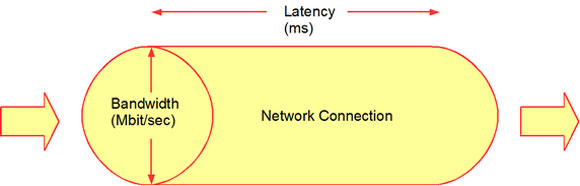 There are other things than bandwidth when you think of network speed. The other thing that many people don't know about is network latency which is a great contributor to the speed of a network. It stands for various delays that happen when a device is processing data that comes from the network. If you talk about a low latency connection it is the faster one because it has small delay and the bigger latency network connection have bigger delays so they are slower because of those delays.
 A firewall can be thought of as a gatekeeper who has been handed over a list of people whom he must allow to enter into the premises and/or the list of those people whose request to enter the premises must be denied straightforward. Just like the role of a gatekeeper, a firewall monitors incoming and outgoing network traffic to and from a computer system and allows or denies the communication of the computer with other computers that are connected to it via Local Area Network (LAN). Since in network communication, the packets are transported over the cable or through wireless media, a firewall allows or denies the communication on the basis of source ...
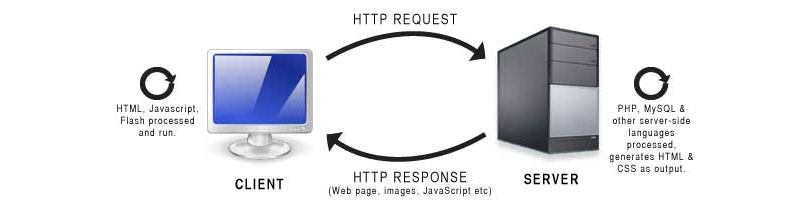 The first time Client/server networks have really began to grow, it was because PCs were also gaining a lot of popularity, it is like they helped each other spread.
 In small-scale organizations and home environments, DHCP servers are installed normally and no class oriented configurations are done. The reason behind this is that by default all DHCP client computers belong to default DHCP class and as soon as DHCP scopes are configured and the DHCP servers become ready to assign dynamic addresses to the client computers, the DHCP clients start receiving the IP addresses without any additional administrative overheads. However, in order to allow DHCP servers to assign different ...
 Having a connection or performance problem with your wireless network? Do you have bad or occasionally low Wi-Fi signals or poor video or audio streaming? Here we will share some tips to increase Wi-Fi performance. And most do not even require spending money.Dynamic Host Configuration Protocol or DHCP servers are the dedicated computers that have network operating systems installed on them and are responsible for providing automatic IP addresses to all the client computers that are configured to obtain the addresses automatically.
 It is not uncommon that Internet connections stay on all the time, which makes you online all day long. People usually leave their router or other network devices on for a very long time, even when they don't need them. But, is this a good or bad thing? Should you keep your network on all the time or not?
.jpg) There are several ways of connecting to networks by using Linksys routers and they are:
There are several ways of connecting to networks by using Linksys routers and they are:1. The manual setup
This is probably the most hands on solution and it is possibly the best one. You will manually connect to a Linksys network by linking your computer to a Linksys router via Ethernet cable, then you open the browser and connect the router console on http://192.168.1.1/. This allows you to do many things such as changing a lot of router options and also many more things.
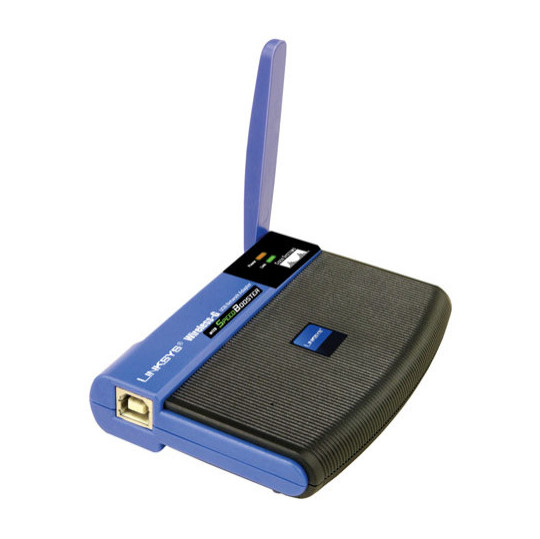 If your computer has a wireless (Wi-Fi) network adapter, you will see the wireless network icon when you click on the Settings button. In order to function, the wireless adapter standard must be equal to or older than the wireless router standard. For example, if the AC adapter in the computer is using a wireless 802.11n (also known as Wireless-N), but the router uses 802.11g (also known as Wireless-G), you will not be able to connect because the Wireless-G standard is an older version and does not recognize the Wireless-N.
.jpg) With increasing use of broadband connection on the network, especially for home users, there is more and more need to establish a home network. This is usually not a problem, since nearly all motherboards include network adapters. Network adapters in the form of cards are extremely cheap, and most routers using ADSL include a switch, which is usually not completely filled out. However, this way of connecting your computer may not always be the most suitable.
With increasing use of broadband connection on the network, especially for home users, there is more and more need to establish a home network. This is usually not a problem, since nearly all motherboards include network adapters. Network adapters in the form of cards are extremely cheap, and most routers using ADSL include a switch, which is usually not completely filled out. However, this way of connecting your computer may not always be the most suitable. There are various types of Internet connections, and each one of them has different properties. This text should help you determine which is best for you.
 It seems to us today that our survival depends on it! Thank God, it is not like that, but information technology is applied in all spheres of life. There are many advantages - the systematic storage of information to an unlimited number of copies and not decaying in a physical sense.In practical terms, availability and cost of intangible form is reduced to almost zero, and the environment is 100% safe.
  VPN supplies network connectivity over possibly long physical distance. In this sense, VPN is a form of a wide area network (WAN). VPN allows file sharing, video conferencing and similar network services. Virtual private networks generally do not provide any new functionality that is not already offered through alternative mechanisms, but VPN applies those services more efficiently/less costing in most cases.
 If you are a home network owner or perhaps a business network owner you are probably seeking to purchase WLAN (wireless local area network) devices and gear. There are a lot of devices and products that fit into the common wireless standard. They are also known as Wi-Fi technologies and the most common are 802.11a, 802.11b and 802.11g. In this text we will compare those standards and tell you the pros and cons of each one of them.
 There are a lot of network terms, and sometimes they can be very confusing. In this article you will read some networks explained, and in tomorrows article you will read the second part of this text, and with that more network terms will be explained.
 You get to work on a Monday morning, and realise that you've left the document you were presenting today back at home on your computer. How do you get it? Or maybe you have a friend that has problems with their computer, and you know how to fix it, but only if you can see it. There could be many more situations where you need to use a particular computer and you're not there. Enter the range of programs known as VNC.
 Wikileaks has been in the news for quite some time now as it has rocked many nations, embroiling itself in controversy over the fact that it has been releasing classified documents which have been termed as potentially harmful for national security as well as international diplomacy. Amidst all the confusion related to it's ethical and moral standards, people around the world have also speculated how the site functions technically, as a site which has been so controversial, might be technologically sound as well because various steps have already been taken in order to shut the Website down but none of them have availed any results.
 You should always avoid buying network gear at the full retail cost. You need to stop yourself from buying a product that has just been released to the market, instead you should wait a month or two months after it has been released because that is usually when vendors offer discounts or rebates.
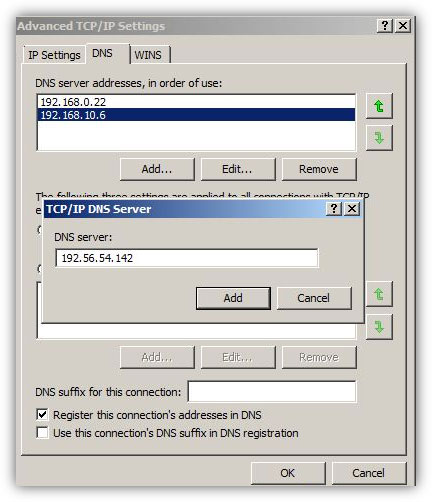 In medium or large-scale organizations where there are several client computers connected to a network, administrators install multiple DNS servers in order to load balance the traffic and to reduce the burden on a single DNS server. Moreover, if there are multiple DNS servers configured in such network scenarios it is likely that administrators might have configured one DNS server as DNS forwarder and have configured other DNS servers to forward the queries to the forwarder. This is an efficient approach that almost all administrators take for error free and smooth name resolution process.
 When you first connect to the network, you will be asked whether you want to include sharing among computers and connect to network devices such as printers. Depending on the answers automatically it sets the appropriate firewall settings and security settings for the type of network you are connecting to. Sharing can be turned on or off at any time.
 There are not enough people who offer advice to help others learn about computer networks. For some reason, however, certain facts about networking tend to be misunderstood. This article describes the commonly held misconceptions that people have.
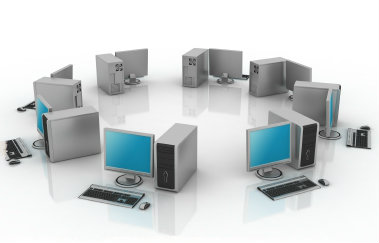 Basic Networking Tutorial - a network is any collection of independent computers that communicate with one another over a shared network medium.A computer network is a collection of two or more connected computers. When these computers are joined in a network, people can share files and peripherals such as modems, printers, tape backup drives, or CD-ROM drives.
 There are home networks, corporate intranets, and Internet Service Providers (ISPs) that use proxy servers (also known as proxies). Proxy servers act as a "middleman" between the two ends of a client/server network connection. Proxy servers work with Web browsers and servers, or other applications, by supporting underlying network protocols like HTTP.
 The growth rate of data traffic in recent years has been an unprecedented trend in mobile communications. If consumption data in mobile networks continues to grow at the same pace, significant transformation in many aspects of the business is inevitable: the network, the business model, appliances, even users. The rapid growth of mobile broadband services and digital content (video streaming, online gaming, social networks) and sales growth of smartphones and tablet devices generate increasing traffic demands in mobile networks.
 LAN switches, which are also sometimes called intelligent hubs, are the networking devices that have completely dominated and replaced Hubs. The reason behind this is that unlike Hubs, that only used to regenerate the received packets and forward them to all the ports that they had, LAN switches create one-to-one virtual circuits directly to the ports to which the destination computers are connected. This reduces the time consumed while transferring the data packets from the source computers to the destination ones.
 Internet business is a very important thing. It can bring you a lot of things, primarily money, but it can also help you make new contacts and meet new people. But internet business is not an overly simple thing. There are a lot of things you need to know before venturing in the world of internet business.
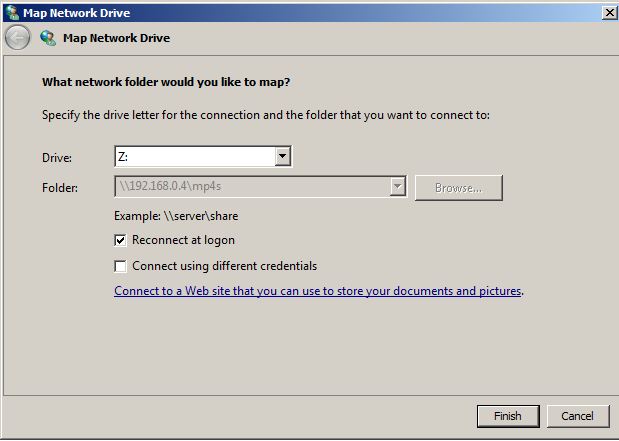 Network drive mapping is a process in which users create shortcuts of shared folders on their local computers. Shared folders can be located anywhere in the network. Shortcuts that users create appear in Computer (in Windows Vista and above operating systems) and My Computer (in pre-Windows Vista operating systems) window.
 In any network setup, network topology plays an important role without which network cannot be established whatsoever. In other words, whenever two or more machines are connected to each other, a topology is automatically formed. Unlike wired networks that have multiple topologies, wireless networks have only two topologies namely Infrastructure and Ad Hoc. Since wireless networks work on unguided media, it makes sense to have limited number of topologies while configuring the wireless network setups. Moreover, since wireless networks are a bit complicated configure as compared to the wired networks, it is essential for the administrators to have ...
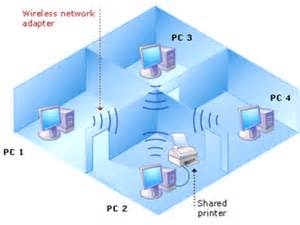 Network file sharing between computers gives you more flexibility than when you are using floppy disks or Zip disks. Not only can you share photos, music files and documents, you can use your home network to save copies of all important data to another computer. Backup is one of the most critical yet overlooked tasks in home networking.
 Like a television program or a detective novel, the computer has the power to keep the user's attention is often much longer than they really wanted this. This is true for adults, but even more so for children. Because it often happens that children can not wait to come back to the computer. Is it therefore to say that the computer is a type of drug that can make their customers dependent? The authors of the book "Child and computer" are generally skeptical about this possibility.
 Using Peer to Peer networks to download music for no cost is an activity that is, although not very much approved, hugely popular in youth and even in adults.
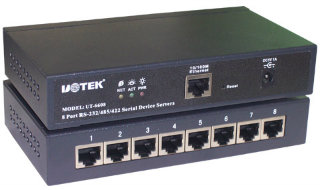 TCP ports will popup almost with any application you use wether it is ICQ or FTP. It will soon be realized how good its knowledge is once you yourself will start applying it in day to day tech use. TCP/IP uses several protocols, the two main ones being TCP and IP.
 In ring topology, data used to transfer in the form of ring where every computer that was connected to the network had two LAN cards and each LAN card was connected to the LAN card of its neighbor computer. Many times ring topology was preferred over bus topology because there were no collisions and the chances of network getting congested were next to 0%.
.jpg) In collective network topology it may happen that two users that are connected to opposite ends with a closer can not communicate because the digital signal is distorted over time and is not as recognizable. Therefore, a device is inserted that has two-way communication and performs restoration of digital signals.
In collective network topology it may happen that two users that are connected to opposite ends with a closer can not communicate because the digital signal is distorted over time and is not as recognizable. Therefore, a device is inserted that has two-way communication and performs restoration of digital signals.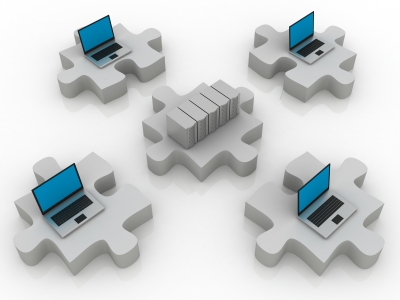 The CIDR notation is otherwise called Classless Inter-Domain Routing. It was first created back in the last decade of the previous century and it was a generic scheme that was used for routing data flows and traffic through the Internet.
 IP and TCP networks use routing tables in order to determine where the messages they forward should go. If you look at the routing table itself, it is a database, very small, and the thing that controls it is the software and hardware that is in the router.
 First, contact your service provider and make sure they do their job properly and provide the service they should. Or maybe your package is obsolete and the company will upgrade it either for free or for a small fee.
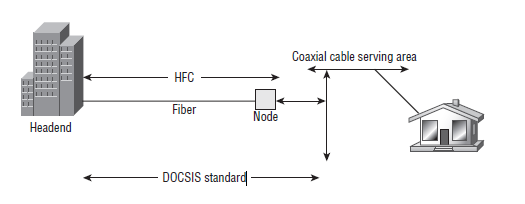 Asynchronous Balanced Mode - an HDLC (and derivative protocol) communication mode supporting peer-oriented, point-to- point communications between two stations, where either station can initiate transmission.
.jpg) It will probably happen that you have to connect into a wireless router in order to do some updates on the routers configuration. In order to gain access to the wireless router and it's configuration you need to be familiar with the IP address of the router and also you need to know the admin password and the username of the wireless router. It is not bad if you are knowledgeable in router problems and fixing those problems.
It will probably happen that you have to connect into a wireless router in order to do some updates on the routers configuration. In order to gain access to the wireless router and it's configuration you need to be familiar with the IP address of the router and also you need to know the admin password and the username of the wireless router. It is not bad if you are knowledgeable in router problems and fixing those problems. There are a lot of factors that determine the range of the connection of a wireless piece of equipment, but the main thing that affects it is the power gain of the antenna. Power gain is a numerical quantity and it is measured in dB, otherwise known as relative decibels. It stands for max effectiveness of one antenna in comparison to a different antenna. You will commonly see 2 standards that are being used by the companies who build them when they speak about measuring gain in antennas. They are dBd and dBi.
 Network latency is a term used for stating the time it takes for information to travel for the sender to the recipient. It is always present, even in the smallest amounts, but that amount depends on a lot of factors. Network latency is more commonly known by the name lag.
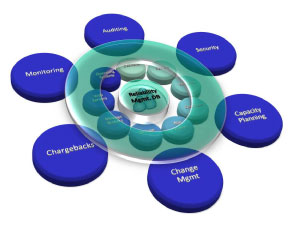 The words bit and byte are really used a lot in computer networking. They both stand for to digital data that is being transmitted through a network connection. Bytes and bits can both represent network addresses or port numbers.
 Windows NT is generally regarded among IT (information technology) professionals as the most stable and secure Windows OS (operating system). Win2000 and WinXP Pro work well in a peer-to-peer network, but these OSes are designed to handle client/server networking, where in multiple clients (computers, or workstations) connect to one or more servers (computers that control the network's software and each client's access to other parts of the network).
 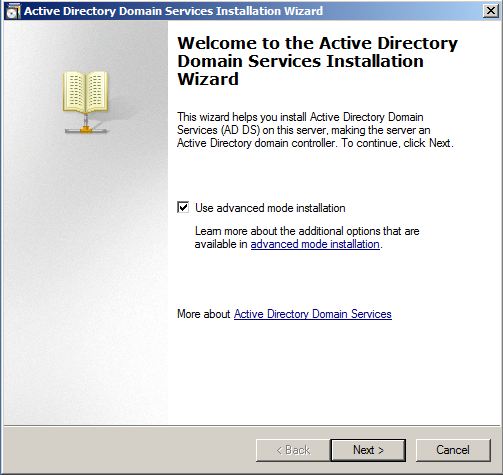 In Microsoft Windows platform all post-Windows 2000 Server network operating systems are shipped along with built-in Active Directory Services (ADS in Windows Server 2003) or Active Directory Domain Services (AD DS in Windows Server 2008) which differentiates them from client operating systems. Although the services are integrated in the network operating systems, they are not automatically installed during the installation of the OS. Because of this when a network operating system is installed on a computer it works as a client operating system and is technically called a ...
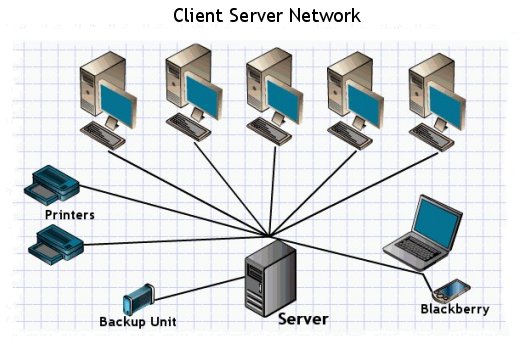 Computer network, according to their size and features they have, are classified into two main groups: A local area network (LAN) is the foundation of any network. It can be simple (two computers connected by a cable), or complex (hundreds of computers and peripheral devices in a large corporation).
  n a nutshell, network topologies are the physical alignments of computers and the way they are connected to each other. For example, if all the computers are connected to each other via a central device (Hub or Switch), the type of topology is Star. Likewise, if all the computers are connected to each other via a main cable, this means it is Bus Topology.
What is Computer Networking?
A network is a collection of connected intelligent computing devices. The connection is not necessarily a fancy one. A connection between two computers by direct cabling is qualified to be a network. By this definition, a workstation which is loaded with a computer, a scanner, and a printer, is not treated as a network.
A network can consist of two computers connected together on a desk or it can consist of many Local Area Networks (LANs) connected together to form a Wide Area Network (WAN) across a continent. The key is that two or more computers are connected together by a medium and are sharing resources. These resources can be files, printers, hard?drives, or CPU number-crunching power.
A Local Area Network (LAN) is a smaller network within one location or between several buildings A Metropolitan Network (MAN, politically incorrect, no WOMAN!) is a midsize network spanning the city. A Wide Area Network (WAN) is a giant network spanning across several cities or even several continents.
|
|||