
Programming Languages
 There are four fundamental phases in most, if not all, software engineering methodologies. These phases are analysis, design, implementation, and testing. These phases address what is to be built, how it will be built, building it, and making it high quality. . These steps together define the cradle-to-grave life cycle of the software project. Obviously, if an action is done many times, it needs to be done correctly and efficiently.
 You wouldn't go to a doctor who had never been to medical school, or hire a lawyer who never studied law. One side-effect of a world advancing as rapidly as ours is that fields are becoming more and more specialized and narrow. People can no longer get by on general knowledge in their careers, something I found out for myself not too long ago. I'd been out of high school for two years, scraping by on my own and picking up scraps of programming as I went. I saw all of the self-taught programmers breaking into the IT industry, and I hoped to do the same. After all, IT is one of the few industries out there where being creative and a quick learner is more important than a degree.
 If you have some misconception in mind that the programming languages are easy or hard, I am afraid to say that you are mistaken. To tell you frankly about the programming languages, there is nothing such as easy or tough programming language. The only thing that you need to keep in mind while stepping into the world of programming languages is that which programming language would set your base by giving you in-depth knowledge of programming logics and the basics of programming techniques.
 Once you have learned some programming languages, you feel yourself completely prepared to enter into the programming world, and start working on the programming languages that you have learned. Many students also feel that they have learned extra things which might be helpful in their programming careers. The matter of fact is that the real world is entirely different from what you have been taught in the classrooms.
 There is an old story of how several blind men set out to understand what an elephant was by examining a live specimen. Each of them explored a different part of the elephant's body. One blind man, falling against the elephant's side, proclaimed that an elephant must be very much like a wall. Another, grasping the elephant's ear, decided that an elephant must closely resemble a leaf. One grabbed the elephant's tail and determined that elephants must resemble ropes.
 One famous saying says that programmers are machines that turn caffeine from coffee and Coca Cola into a programming code. And if you ask a programmer when does he like working the most and when is he most productive - he is probably going to say late at night or early in the morning, that is when he has the greatest energy and concentration to work.
 To be a good programmer is difficult and noble. The hardest part of making real a collective vision of a software project is dealing with one's coworkers and customers. Writing computer programs is important and takes great intelligence and skill. But it is really child's play compared to everything else that a good programmer must do to make a software system that succeeds for both the customer and myriad colleagues for whom she is partially responsible. In this essay I attempt to summarize as concisely as possible those things that I wish someone had explained to me when I was twenty-one.
 This is probably the second best Python tutorial on the web. Why second best you ask? Simple because www.python.org has already done such a wonderfull job on their tutorial. But if you want to get your hands dirty from the start, you may want to take a whack out our Python tutorial thats assembled for the beginners.
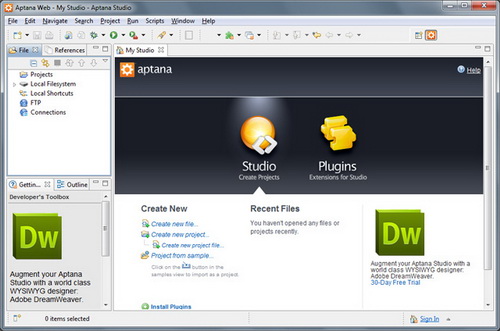 IDE (Integrated Development Environment) represents an integrated development environment in which you can develop applications. This tutorial will be useful to all those that considering doing programing...
What is Python?
Python is an interpreted, interactive, object-oriented programming language developed by Guido van Rossum. The name comes from one of van Rossum's favorite television shows, Monty Python's Flying Circus. Python combines remarkable power with very clear syntax. It has modules, classes, exceptions, very high level dynamic data types, and dynamic typing. There are interfaces to many system calls and libraries, as well as to various windowing systems (X11, Motif, Tk, Mac, MFC). New built-in modules are easily written in C or C++. Python is also usable as an extension language for applications that need a programmable interface. The Python implementation is portable: it runs on many brands of UNIX, on Windows, DOS, OS/2, Mac, Amiga... If your favorite system isn't listed here, it may still be supported, if there's a C compiler for it. The Python implementation is copyrighted but freely usable and distributable, even for commercial use.
Tips
Module running
In the Python IDE on Windows, you can run a module with File->Run?(Ctrl-R). Output is displayed in the interactive window.
In the Python IDE on MacOS, you can run a module with Python->Run window?(Cmd-R), but there is an important option you must set first. Open the module in the IDE, pop up the module's options menu by clicking the black triangle in the upper-right corner of the window, and make sure ?Run as __main__? is checked. This setting is saved with the module, so you only have to do this once per module.
On UNIX-compatible systems (including MacOS X), you can run a module from the command line: python odbc helper.py ?
Declaring Functions
Automatic data typing is a double-edged sword. It's convenient, and it can be extremely powerful. But it places an additional burden on you to understand when and how Python coerces data into different types.
Documenting Functions
Many Python IDEs use the docstring to provide context-sensitive documentation, so that when you type a function name, its docstring appears as a tool tip. This can be incredibly helpful, but it's only as good as the doc strings you write.
Testing Modules
On Mac Python, there is an additional step to make the if __name__trick work. Pop up the module's options menu by clicking the black triangle in the upper-right corner of the window, and make sure Run as __main__ is checked.
Profiling Code
The first step to speeding up your program is learning where the bottlenecks lie. It hardly makes sense to optimize code that is never executed or that already runs fast. I use two modules to help locate the hotspots in my code, profile and trace.
Profile Module
The is included as a standard module in the . Using it to profile the execution of a set of functions is quite easy. Suppose your main function is called main, takes no arguments and you want to execute it under the control of the profile module. In its simplest form you just execute
|
Importprofile |
When main() returns, the profile module will print a table of function calls and execution times. The output can be tweaked using the Stats class included with the module. For more details, checkout the profile module's documentation ().
Sorting
Sorting lists of basic Python objects is generally pretty efficient. The sort method florists takes an optional comparison function as an argument that can be used to change the sorting behavior. This is quite convenient, though it can really slowdown your sorts.
An alternative way to speed up sorts is to construct a list of tuples whose first element is a sort key that will sort properly using the default comparison, and whose second element is the original list element.
Suppose, for example, you have a list of tuples that you want to sort by the n-th field of each tuple.
String Concatenation
Strings in Python are immutable. This fact frequently sneaks up and bites novice Python programmers on the rump. Immutability confers some advantages and disadvantages. In the plus column, strings can be used a keys in dictionaries and individual copies can be shared among multiple variable bindings. (Python automatically shares one- and two-character strings.) In the minus column, you can't say something like, "change all the 'a's to 'b's" in any given string. Instead, you have to create a new string with the desired properties. This continual copying can lead to significant inefficiencies in Python programs.
Don't forget that Python does all method lookup at runtime.
Loops
Python supports a couple of looping constructs. The for statement is most commonly used. It loops over the elements of a sequence, assigning each to the loop variable. If the body of your loop is simple, the interpreter overhead of the for loop itself can be a substantial amount of the overhead. This is where the function is handy. You can think of map as a for moved into C code. The only restriction is that the "loop body" of map must be a function call.
Here's a straight forward example. Instead of looping over a list of words and convert ing them to upper case:
|
newlist= [] |
you can use map to push the loop from the interpreter into compiled C code:
|
importstring |
List comprehensions were added to Python in version 2.0 as well. They provide a syntactically more compact way of writing the above for loop:
|
newlist= [s.upper() for s in list] |
Avoiding dots...
Suppose you can't use map? The example above of converting words in a list to upper case has another inefficiency. Both newlist.append and string.upper are function references that are recalculated each time through the loop. The original loop can be replaced with:
|
importstring
|
Local Variables
The final speedup available to us for the non-map version of the for loop is to use local variables wherever possible. If the above loop is cast as a function, append and upper become local variables.
|
deffunc(): |
Initializing Dictionary Elements
Suppose you are building a dictionary of word frequencies and you've already broken your words up into a list. You might execute something like:
|
wdict= {} |
forword in words:
|
? ?if not has_key(word): wdict[word] = 0 |
Except for the first time, each time a word is seen the if statement's test fails. If you are counting a large number of words, many will probably occur multiple times. In a situation where the initialization of a value is only going to occur once and the augmentation of that value will occur many times it is cheaper to use a try statement:
|
wdict= {} |
It's important to catch the expected Key Error exception, and not have a default except clause to avoid trying to recover from an exception you really can't handle by the statement [s] in the try clause.
Import Statement Over headz
import statements can be executed just about anywhere. It's often useful to place them inside functions to restrict their visibility and/or reduce initial startup time. Although Python's interpreter is optimized to not import the same module multiple times, repeatedly executing an import statement can seriously affect performance in some circumstances.
Using map with Dictionaries
I found it frustrating that to use to eliminate simple for loops like:
|
dict= {} |
I had to use a form or define a that would probably negate any speedup I was getting by using map in the first place. I decided I needed some functions to allow me to set, get or delete dictionary keys and values enmasse. I proposed a change to Python's dictionary object and used it for a while. However, a more general solution appears in the form of the operator module in Python 1.4. Suppose you have a list and you want to eliminate its duplicates. Instead of the code above, you can execute:
|
dict= {} |
This moves the for loop into C where it executes much faster.
Data Aggregation
Function call overhead in Python is relatively high, especially compared with the execution speed of a built-in function. This strongly suggests that extension module functions should handle aggregates of data where possible. Here's a contrived example written in Python. (Just pretend the function was written in C. :-)
|
x= 0 |
Even written in Python, the second example runs about four times faster than the first. Had do it been written in C the difference would likely have been even greater (exchanging a Python for loop for a C for loop as well as removing most of the function calls).
Doing Stuff Less Often
The Python interpreter performs some periodic checks. In particular, it decides whether or not to let another thread run and whether or not to run appending call (typically a call established by a signal handler). Most of the time there's nothing to do, so performing these checks each pass around the interpreter loop can slow things down. There is a function in the sys module, set check interval, which you can call to tell the interpreter how often to perform these periodic checks. In Python 1.4 it defaults to 10. If you aren't running with threads and you don't expect to be catching lots of signals, setting this to a larger value can improve the interpreter's performance, sometimes substantially.
Adding a Missi ng string. replace Function
The Python 1.4 string module lacks there place (str, old, new [, max]) function. The following code adds it to the imported string module just in case it isn't there:
|
importstring? ? # Of course, don't import string againif you've already done so. |
How can I check if a number is contained in a range?
|
>>>x=5 |
How can I check that the Python version is recent enough to run my program?
Note that [1, 5, 2] < [1, 6].? in other words, this will do what you want:
|
?import string, sys |
I can be better to not check the version - this will bound poor user to one version. Instead, check for the feature you need. You need a library? Try to import it and fall back gracefully:
|
? ?import pagecast_lib |
How can I trap a keyboard interrupt using Python?
|
importsys |
Is it possible to not have to explicitly do imports?
I would suggest instead that you add an object to the global dictionary in your site setup. It could be called "mods" (for brevity). You would hookup "mods.__getattr__" so that you would say:
|
fl=mods.glob.glob('*') |
I thought about this once and it seemed pretty cool to me as a shortcut.
You could argue that we could dump the import statement...(but I wouldn't) Having an explicit object as the root for the dynamically generated package tree would be more Pythonic than having every module magically appear in your global package namespace. Package support needs more thinking through...
What are my options for HTML parsing?
The Python Standard library includes an html lib module, which supports HTMLparsing. To use this module, create a subclass of the html lib. HTMLParser class. Within your subclass, define start_tag() and end_tag() methods for each tag you wish to handle.? Feed data into your parser by calling the feed() method.
|
|||